
Copy Your File Names to the Clipboard

There are times when you might want to be able to have a list of file names, maybe your documents or photos or even music.  You might want to copy them to the "Clipboard" so the text can be moved to a word processing program such as MS Word, MS Excel or even to Wordpad or Notepad to be manipulated, printed or just saved.


It isn't as difficult as you might think, especially with Vista or Windows 7.
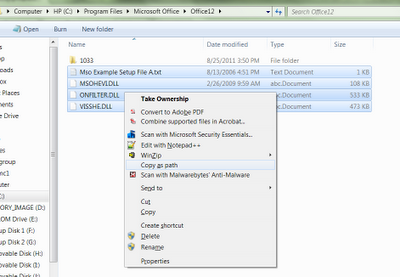
Screen Capture of Windows Explorer Copy As Path
  1. In Windows Explorer, highlight one or more files.
  2. Hold down the shift key, and right-click on any of the highlighted files.  
  3.  When the context menu pops up, left click on the Copy As Path entry that has magically appeared because you're holding the shift key down.
  4. Now it is saved in the "Clipboard" and you can use CTRL/V to paste it to the program of your choice.
What a great tip! ☺

Comments

Popular posts from this blog

Funny Little Characters

Ever wonder how to make those cute facebook symbols such as musical notes and hearts on your PC? You can add them to your documents, emails and more if you know the secret. These are special character codes. Although there are different ways to create these, this is a fairly easy keyboard shortcut to what is called the "character map" on your computer. [You can find the character map by clicking on the Microsoft start menu button and typing in "Character Map".] If you’re on a laptop make sure you ‘Num Lock’ is on! The ‘Num Lock’ button is on the top right of your keyboard. Next, hold down ‘alt’ (the one in the bottom left of your keyboard or on either side of the space bar) and type the following on the numeric keyboard (not the top row of numbers): Hold ‘alt’ then type 1 – ☺ Hold ‘alt’ then type 2 – ☻ Hold ‘alt’ then type 3 – ♥ Hold ‘alt’ then type 4 – ♦ Hold ‘alt’ then type 5 – ♣ Hold ‘alt’ then type 6 – ♠ Hold ‘alt’ then type 7 – • Hold ‘alt...

The New Visual Network: Pinterest

This new up and rising website star has no visible means of support, contains millions of pictures and receives visits from 10 million people in the U.S. each month. It was listed as one of the The 50 Best Websites of 2011 by Time Magazine.  It has received some impressive free media exposure with Reese Witherspoon stating it has "a collection of the most amazing, wonderful craftiness on the earth!" So what is Pinterest?  It has been called a visual bulletin board for the Web. People post images of what they love:  food, clothing, crafts, books, movies, decorating, travel, photography, videos.. you name it, it's there. Images are called "Pins" and they can be uploaded or with a small application added to your browser, from websites.  Once something in "pinned" on Pinterest, you can "Repin" to add it your board.  Many of the pins are linked to their original location on the web ( to double click on the full size image), so instructions ...

Clean Up Your Notifications

  OK.  On any giving day I used to get hundreds of email notifications. Why do I need so many? I don't, really.  I am on many of the social networks daily.  But it takes time to change all those different sites.. or does it. I was browsing on Pinterest (feel free to follow me!) and I found this really cool tech website. It is worth sharing! You can modify your notifications with the click of a button on the website. Simple, convenient and amazing. Drop on by http://notificationcontrol.com and reduce your email overload!☺