What is Phishing? Well, it is where cybercriminals "try to obtain financial or other confidential information from Internet users, typically by sending an e-mail that looks as if it is from a legitimate organization, usually a financial institution, but contains a link to a fake Web site that replicates the real one." (Thank you reference.com for this definition.)
A prime example was an email that I received today.. There are some hints that will allow you to identify this deception.
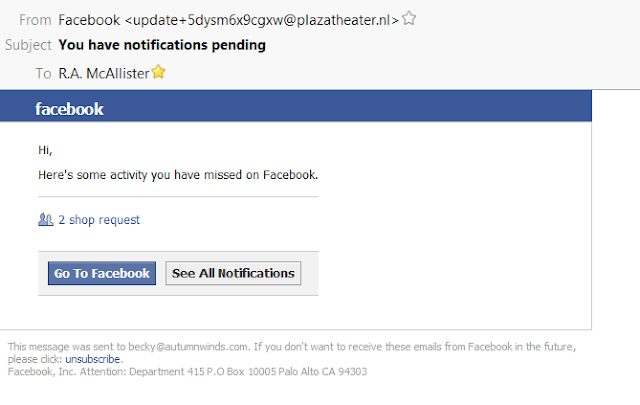 First, look at the "From" email address.. update+5ds.... @plazatheater.nl. It isn't a Facebook address although sometime they will use an address that has the words in there, such as Facebook so read it carefully.
Second, I have more than one email address. and this phishing email came to an address that I do not have listed on Facebook. This may or may not apply to you, but it does make me think about the email being a scam.
Third, when I hover my cursor arrow over the links, your email software will show you the address. The links in this email are not to Facebook but to some other URL address (netrxcialis.be). Since when has Facebook been into Cialis distribution?
So these red flags let me know that this is garbage designed to try and get me to give away my personal information or try and con me into clicking on the link and going to their website. This is another a prime example of social engineering. Play it safe, online and off. The internet is a great place, with tons of information but you need to be "street smart" and don't get scammed. ☺

A prime example was an email that I received today.. There are some hints that will allow you to identify this deception.

Second, I have more than one email address. and this phishing email came to an address that I do not have listed on Facebook. This may or may not apply to you, but it does make me think about the email being a scam.
Third, when I hover my cursor arrow over the links, your email software will show you the address. The links in this email are not to Facebook but to some other URL address (netrxcialis.be). Since when has Facebook been into Cialis distribution?
So these red flags let me know that this is garbage designed to try and get me to give away my personal information or try and con me into clicking on the link and going to their website. This is another a prime example of social engineering. Play it safe, online and off. The internet is a great place, with tons of information but you need to be "street smart" and don't get scammed. ☺

Comments
Post a Comment